Around a month back I upgraded from 7.10 to 8.04
Most of the stuff worked fine except that my Bluetooth service was broken. I could no longer transfer files from my Nokia 3230 phone to my laptop. The steps defined in my earlier post did not work either and I was always greeted with an “Unable to connect” error. It became terribly irritating after a while and then there had to be a way to get around that.
The way that I suggest is one of the possible many ways, if you find something else please let me know. Read on …
There is a bug Bug #191704 in bluez-utils (Ubuntu) reported on forums which gave me hint on how to make it work.
The crux is that there are some problem with missing hidd in newer versions of bluez-utils as a result of which you have to downgrade to an older version of bluez-utils which works.
These are the steps to downgrade
1. sudo dpkg -r bluez-audio bluez-utils
2. Visit http://de.archive.ubuntu.com/ubuntu/pool/main/b/bluez-utils/, down load and install the package bluez-utils_3.9-0ubuntu4_i386.deb.
Once you start installing you would be warned for an upgrade already present. Ignore that!

Once the installation begins it would prompt for replacing your hcid.conf. Do not replace that. I am assuming that you have already made all the changes described in my earlier post.
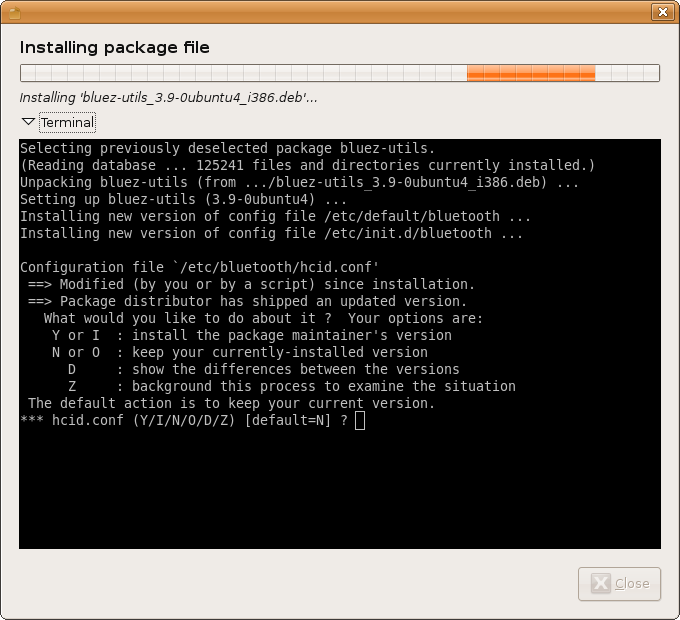
Your Bluetooth service would be restarted.
3. Now restart your Bluetooth file sharing application, under Applications–>Accessories–>BlueTooth File Sharing
4. Do a send via bluetooth via your mobile and you should be all set.

 c0nnexx10n : C0nnect1ng L1fe w1th Techn010gy
Santam
Thursday, June 19, 2008
That worked Thanks
Now to get my mobile set up as a modem 🙂
anand
Wednesday, July 2, 2008
Dear Vikash,
I am a new Ubuntu 8.04 user. I use a Compaq Presario B3800.
I have Bluez Util installed in my Ubuntu.
Yet, I cannot find Applications–>Accessories–>BlueTooth File Sharing.
Any idea why, mate?
vikashazrati
Wednesday, July 2, 2008
Hi Anand,
You would have to follow the steps mentioned in my earlier post. It would be better to have a look at that. In a nutshell you would have to install the gnome-bluetooth. Here are the steps.
Then open Synaptic Package Manager (from the System -> Administration menu). Search for and install gnome-bluetooth.
Next, open a terminal window, and type the following, which will open the rc.local configuration file in Gedit:
Code:
gksu gedit /etc/rc.local
Scroll down to the blank line above “exit 0”, and type the following:
Code:
hciconfig hci0 inqmode 0
Note that the characters in the line after hci and inqmode are zeros and not the letter “O”. Save the file, close Gedit, and then restart your computer.
anand
Thursday, July 3, 2008
Hi Vikas,
Thank you for the rapid reply!
I did not realise that I needed the Gnome Bluetooth application as well.
Tried installing it through Synaptics Package Manager. But it didn’t let me install it, citing the following problem:
“W: Failed to fetch http://au.archive.ubuntu.com/ubuntu/pool/main/libb/libbtctl/libbtctl4_0.9.0-2_i386.deb
403 Forbidden
W: Failed to fetch http://au.archive.ubuntu.com/ubuntu/pool/main/g/gnome-bluetooth/libgnomebt0_0.11.0-0ubuntu1_i386.deb
403 Forbidden
W: Failed to fetch http://au.archive.ubuntu.com/ubuntu/pool/universe/g/gnome-bluetooth/gnome-bluetooth_0.11.0-0ubuntu1_i386.deb
403 Forbidden”
Grrrr!
anand
Friday, July 4, 2008
Ah Vikas, dont worry about the above. I solved it. It is due to an unrelated problem.
Managed to install Gnome Bluetooth and inserted the code lines you mentioned. Still no luck. My cellphone still cannot detect a Bluetooth connection in the vicinity.
Maybe the Ubuntu operating system is not able to sync with my Bluetooth card?
I will try to solve this problem and let u know.
Cheers.
srfito
Wednesday, July 9, 2008
Hi, Vikas.
First of all, thank you very much for your explanations. I’m completely new at Linux, but I managed to follow your instructions. However, I’m afraid they didn’t work in my laptop (Sony Vaio VGN-SZ71MN/B). The situation is the same as before: everything seems to be ok (I made some tests that I read about with the terminal), but it cannot detect mobile phones, and mobile phones cannot detect it. Do you know what can be happening?
Thanks very much in advance.
Fidel
vikashazrati
Wednesday, July 9, 2008
Hi Fidel,
Did you follow the instructions in part I as well as part II?
srfito
Thursday, July 10, 2008
Yes, I did… but I got nothing.
Thanks again.
F
Kasidit
Wednesday, November 12, 2008
Thanks! I was searching for a fix to this “send failed” from mobile problem for quite a while! It worked!
Kasidit
Wednesday, November 12, 2008
Unfortunately, after doing this fix for obex-receive, the bluetooth audio/headset feature is not working though. I had to re-install the bluez utils and audio to get my bt headset working again, but the obex receive is gone again – haha – maybe i should choose between wireless music and obex receive!
Nuno Leitao
Friday, January 30, 2009
THANK YOU SO MUCH!!!!!!!!!!!!!!!!!!!!!!!!!!!!!!!!!!!!!!!!!!!!!!!!
THANK YOU SO MUCH!!!!!!!!!!!!!!!!!!!!!!!!!!!!!!!!!!!!!!!!!!!!!!!!
THANK YOU SO MUCH!!!!!!!!!!!!!!!!!!!!!!!!!!!!!!!!!!!!!!!!!!!!!!!!
THANK YOU SO MUCH!!!!!!!!!!!!!!!!!!!!!!!!!!!!!!!!!!!!!!!!!!!!!!!!
after all there’s really a problem about ubuntu…
I managed well in debian 2 years ago…. now I just couldn’t understand what could it be…
THANK YOU SO MUCH!!!!!!!!!!!!!!!!!!!!!!!!!!!!!!!!!!!!!!!!!!!!!!!!
THANK YOU SO MUCH!!!!!!!!!!!!!!!!!!!!!!!!!!!!!!!!!!!!!!!!!!!!!!!!
THANK YOU SO MUCH!!!!!!!!!!!!!!!!!!!!!!!!!!!!!!!!!!!!!!!!!!!!!!!!
Devroop
Tuesday, March 9, 2010
Hi! That version of bluez-utils is no longer available in the linked directory.. Any idea where I can find it or some other way to get the bluetooth receive function working in Hardy?
Thanks!
Vikas Hazrati
Wednesday, March 10, 2010
Is upgrading Ubuntu an option for you anyway? 9.10?
Devroop
Wednesday, March 10, 2010
Have been using Hardy for nearly 2 years now — upgrading would be the very last option. No problems other than this pesky bluez thing.
No chance of getting hold of the older 3.9 version?